




























HubSpot Diamond Solutions Partner

HubSpot & RingCentral Integration: Unify Your GTM Communications

Connect your cloud phone system directly to your CRM with Ringcentral Hubspot integration. This integration embeds RingCentral’s full calling, SMS, and AI capabilities into HubSpot, logging every conversation automatically.

98.5%
Client Retention
300+
Platforms Integrated
20B+
Fields Synced Annually
HubSpot Diamond Partner

Get Your Free HubSpot Consultation + Claim The 2025 CRM Growth Playbook Instantly for FREE

Discover how top companies use their CRM to power marketing, sales & growth. No spam. No sales pitch. Just expert insights from certified HubSpot professionals.

🎁Bonus: Submit the form to Instantly download The 2025 CRM Growth Playbook for highest ROI
(Offer valid for Limited Time Only)

HubSpot RingCentral Integration for Automatic Call Logging and Activity Tracking

RingCentral handles over 2 billion minutes of voice calls and video meetings per year across 400,000+ business customers. But those calls are invisible to HubSpot unless someone manually logs them. Sales teams making 50 to 100 outbound calls per day can't afford to spend the last 10 minutes of every hour updating CRM records. These are the teams that gain the most when RingCentral data flows directly into HubSpot.

Inside Sales and SDR Teams

High-velocity sales teams running 60 to 120 call attempts per rep per day need automatic call logging, not manual CRM updates. When every inbound and outbound RingCentral call auto-logs to the correct HubSpot contact with duration, outcome, and recording, reps recover 45 to 60 minutes of daily selling time. That time compounds into pipeline.

Customer Service and Contact Centers

Service teams handling 300 to 1,000 inbound calls per day need caller context at pickup, not after a 90-second lookup. Surfacing HubSpot contact data through RingCentral screen pop means agents know the account status, open tickets, and recent purchase history before the caller finishes saying hello.

Healthcare and Medical Practices

Patient-facing teams using RingCentral for appointment scheduling and follow-up calls need interaction records tied to patient profiles in HubSpot. Syncing call logs, voicemail transcripts, and scheduling outcomes to HubSpot contact records reduces documentation overhead and keeps patient interaction histories complete.

Empower Your Sales Team with an Embedded CTI Dialer

Give your sales team the tools to hit their number without ever leaving HubSpot. This integration streamlines the entire sales workflow, from prospecting to closing.

Click-to-Call from Any Record: Initiate calls instantly by clicking any phone number in a HubSpot contact, company, or deal record.

Get Instant Context with Screen Pops: When an inbound call arrives, an "instant screen pop" displays the caller's HubSpot record, giving your rep immediate access to their history, open deals, and past activities.

Log Every Interaction: Automatically log every call, recording, and SMS/MMS message to the correct HubSpot timeline.

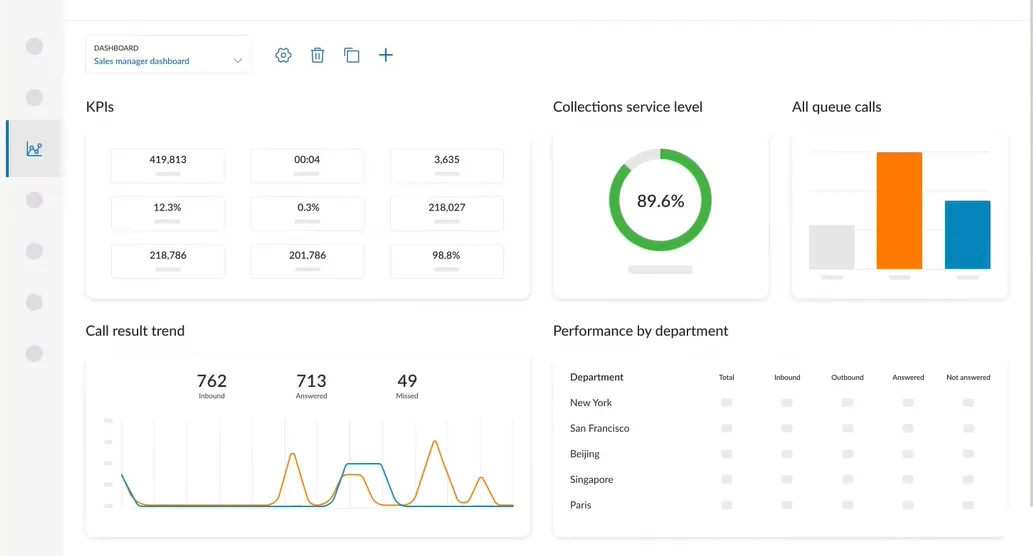
Analyze Calls with AI: Use RingCentral’s integrated AI to get instant call summaries, identify action items, and capture key insights directly within the HubSpot activity log.

RingCentral dashboard

Give your sales team the tools to hit their number without ever leaving HubSpot. This integration streamlines the entire sales workflow, from prospecting to closing.

Integrate IQ has consistently shown they can be trusted with even the most complex projects. I know our customers are in great hands and that the job will always get done right.

Kathleen Rush

Manager, Strategic Partner Development Team at HubSpot

Supercharge Service Hub with 360-Degree Context

Give your customer service agents the information they need to resolve issues on the first call. By unifying RingCentral and HubSpot, you create a seamless support experience.

Automatically Create Tickets: Configure the integration to automatically create a new HubSpot ticket for each incoming support call, ensuring no query is ever lost.

Log Calls to Tickets and Deals: Associate call logs, recordings, and dispositions with multiple records at once, such as the contact, their company, and their open support ticket.

Route Calls Intelligently: Use a custom integration to route inbound callers to their dedicated support agent or account manager. If a caller is matched to a HubSpot contact, the integration can check the "Contact Agent" property and route the call directly to that user in RingCentral.

Unified Message Hub: Access all communications—including SMS, voicemail, and faxes—from one centralized place within HubSpot, giving agents the full picture of every interaction.

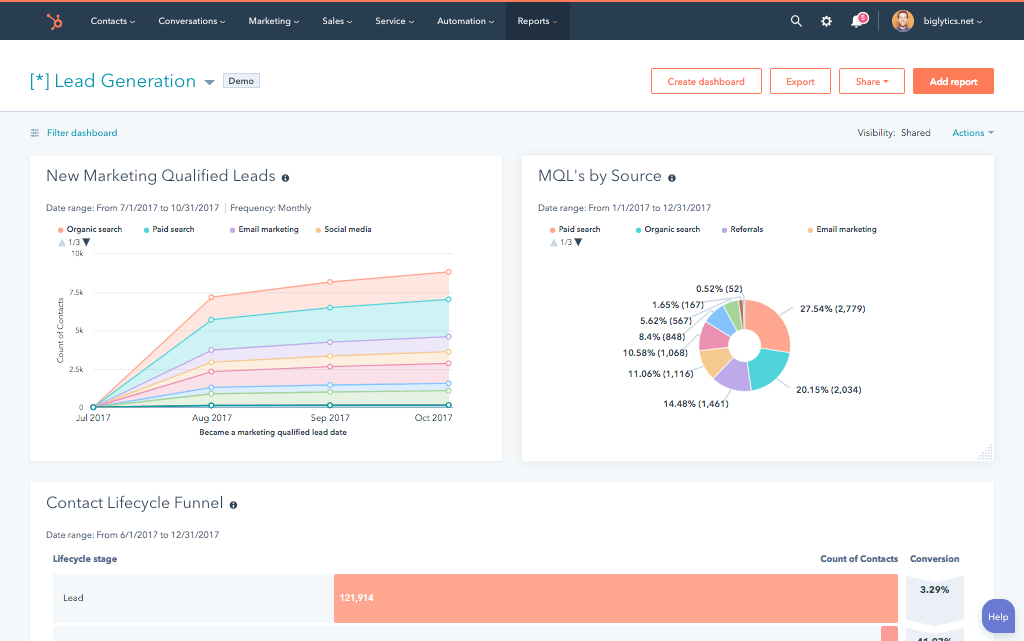
Hubspot Report

Give your customer service agents the information they need to resolve issues on the first call. By unifying RingCentral and HubSpot, you create a seamless support experience.

A Flexible Sync Built for Your RevOps Process

Our custom integrations are engineered for flexibility and scale, handling any business logic and data transformation you require.

Built for Your Business Process

The standard native integration is a great start, but it's often limited in its customization and logic. We build a robust, two-way sync that maps to your unique GTM processes, going far beyond simple call logging.

  • Bi-Directional & Uni-Directional Sync: We configure a true two-way sync for your contacts, ensuring your HubSpot CRM and RingCentral personal directory are always identical. Call activities are synced one-way from RingCentral to HubSpot to maintain a clean activity timeline.
  • Real-time & Scheduled Syncs: Sync all calls and SMS messages in real-time to the HubSpot timeline. We also configure historical syncing to bring all your existing data up to date from day one.
  • Custom Sync Logic & Triggers: This is where a custom solution shines. We build rules the native connectors can't. Only create a new contact if the call comes from an unknown number. Automatically create and associate a new deal if a call is dispositioned as "Qualified Lead." Trigger a HubSpot workflow based on a specific call outcome.
  • High-Volume Data Handling: For busy call centers, data integrity is crucial. Our integration is built to handle high-volume calls and server-side logging, ensuring that even calls taken on a desk phone or mobile app—not just the CTI—are captured and logged in HubSpot.

Comprehensive Object & Field Mapping

We ensure seamless data integration between HubSpot and RingCentral by mapping call logs, contacts, and custom fields to provide a unified view of customer interactions and improve communication tracking across sales and support teams.

HubSpot

RingCentral

  • Contacts
  • Companies
  • Deals
  • Tickets
  • Engagements (Calls, SMS)
  • Notes
  • Call Outcomes
  • Contacts
  • (Associated via Contact)
  • (Associated via Call Log)
  • (Associated via Call Log)
  • Phone Calls, SMS/MMS, Voicemails
  • Call Notes / AI Summaries
  • Call Dispositions
  • Contacts Contacts
  • Companies (Associated via Contact)
  • Deals (Associated via Call Log)
  • Tickets (Associated via Call Log)
  • Engagements (Calls, SMS) Phone Calls, SMS/MMS, Voicemails
  • Notes Call Notes / AI Summaries
  • Call Outcomes Call Dispositions

Your 8-Week Path from Unlogged Calls to Automated Call Intelligence in HubSpot

Most integration projects stall before they start because no one maps the actual process. IntegrateIQ runs a structured 8-week delivery cadence with defined stage gates, clear pricing, and documented acceptance criteria for every deliverable. Most integration projects stall before they start because no one maps the actual process. IntegrateIQ runs a structured 8-week delivery cadence with defined stage gates, clear pricing, and documented acceptance criteria for every deliverable.

week 01

Discovery and Requirements Mapping

IntegrateIQ engineers audit your RingCentral setup (user hierarchy, call queues, IVR flows, disposition codes) and HubSpot configuration (contact properties, deal stages, workflow logic). Output is a documented data flow map covering every call event and its corresponding HubSpot action.

week 02

Fixed Scope, Pricing, and Acceptance Criteria

Fixed-scope proposal with line-item deliverables and acceptance criteria for every feature. Project-based pricing with no hourly billing.

week 03

Environment Setup and API Configuration

RingCentral and HubSpot sandbox environments configured. OAuth credentials, webhook endpoints, and API tokens established and validated.

week 04-05

Core Integration Build

Auto-call logging, screen pop configuration, disposition-to-property mapping, voicemail transcript sync, and click-to-call automation built and tested in sandbox.

week 06

Workflow and Automation Layer

HubSpot workflows triggered by RingCentral call outcomes go live in sandbox. Your sales ops and CRM admins review every workflow before production deployment.

week 07

User Acceptance Testing (UAT)

Reps and admins run live test scenarios: inbound calls trigger screen pops, completed calls auto-log to HubSpot, dispositions update deal properties. Every gap resolved before production.

week 08

Production Deployment and Handoff

Integration goes live with 48 to 72 hours of monitored traffic. Full documentation, handoff call, and post-launch support included.

Start your 8-week roadmap today.

Get a Free Consultation

Transparent, Project-Based Pricing

No surprises. Clear scope, clear acceptance tests. We believe in straightforward pricing so you know exactly what to expect before we begin.

We fix what others can't: 50% Of our customers hired us to fix a failed integration.

A failed integration is more than a technical problem: it's a drain on time, budget, and morale. We are the specialists that leading companies like MetLife trust to handle their most mission-critical data flows. We don't rely on fragile connectors or simplistic platforms because we know they can't handle enterprise scale. Our approach is built on robust, custom development and a deep understanding of both HubSpot and the systems you need to connect it to. Partnering with us isn't just another attempt; it's an investment in certainty.

Trusted by Leaders, Proven by Results

Trusted by High-Growth Companies

See why leaders at scaling companies partner with Integrate IQ's experts.

I've been working with Integrate IQ for over 2 years now. We've had several outside systems that we wanted integrated with our HubSpot instance. From project planning and scoping, through build, and after deployment support, the team at Integrate IQ has been exemplary to work with. They've delivered on all commitments, helped established reasonable time frames for deliverab…

Marohn, M

We've partnered with Integrate IQ for over five years to develop integrations between our complex and not-so-widely-known ERP. They understand HubSpot's strengths, weaknesses and limitations, and are able to easily adapt to our evolving needs. They had an ownership change a few years ago, but that did not impact their expertise/service. We really appreciate our relationship…

Craychee, A

Integrate IQ has been great to work with! As someone who can be intimidated when things get too technical, they made the process of outlining our integration very approachable and understandable. They're great to work with and built the integration that we asked for, and then continued to work with us to fine-tune the tool over time as we figured out exactly what we needed.

Lauren Little

Integrate has been fantastic to work with. They helped us implement our CRM, design a framework for our pipeline that works perfectly and they built out an integration between HubSpot and Netsuite which allows our data to flow seamlessly. They've been an invaluable partner in our growth.

Whipple, M

We worked with Integrate IQ on a complex integration and now we have a fantastic solution that makes HubSpot work even better!

Ben Donahower

HubSpot Is the Platform. We Make It Perform

Why Businesses Trust Integrate IQ for a Smarter HubSpot Experience

Category
HubSpot Direct
Integrate IQ
Setup Approach
Guided setup with best-practice coaching.
Done-for-you configuration — we build and optimize everything for you.
Integrations
Standard native apps and limited connectors.
Custom integrations with 300+ platforms — fully tested and supported.
CRM Migrations
Basic import support.
Complete migration from any CRM — clean data, mapped fields, zero downtime.
Technical Capability
Advisory-focused.
Engineer-led builds with API, automation, and custom object expertise.
Ongoing Support
Ticket-based, reactive
Dedicated partner support, proactive optimization & monitoring
Team Expertise
Generalists across thousands of accounts
Senior HubSpot engineers with 300+ complex integrations delivered
Frequently Asked Questions

Frequently Asked Questions

The standard native integration is excellent for CTI and basic call logging. A custom integration provides deeper flexibility, such as intelligent call routing based on HubSpot owner properties, creating deals from call dispositions, and ensuring 100% of calls (even from devices outside HubSpot) are logged via server-side syncing.

Yes. The integration logs all business SMS and MMS messages as activities on the HubSpot contact's timeline, giving you a complete, omnichannel conversation history.

Yes. When a call comes from an unknown number, the integration can be configured to automatically create a new contact in HubSpot, ensuring you capture every potential lead.

Absolutely. You can use RingCentral data as an enrollment trigger. For example, a call disposition of "Follow-up Required" can automatically create a task for the rep, and a call to the support line can trigger a customer satisfaction survey.

See What a Truly Unified Communications Platform Looks Like

Schedule a free discovery call, and we'll map out your communication data flow and show you how to turn every conversation into a reportable, actionable event.

Book Your HubSpot Discovery Call!

Post You May Like

Contact Us Book A Meeting